> For the complete documentation index, see [llms.txt](https://docs.consentik.com/llms.txt). Markdown versions of documentation pages are available by appending `.md` to page URLs; this page is available as [Markdown](https://docs.consentik.com/consentik-gdpr-cookie-banner-for-shopline/settings/glass-effect-for-a-modern-look.md).
# Glass Effect for a Modern Look
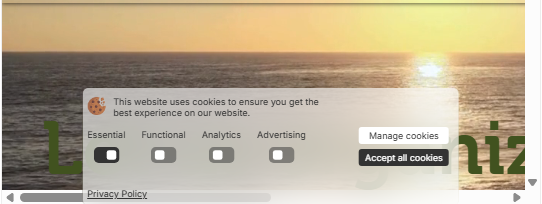
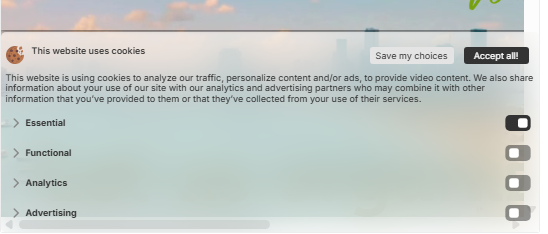
Make your cookie banner and preferences popup stand out with Consentik’s elegant **Glass Effect**. This feature adds a stylish, frosted-glass appearance, elevating the design and professionalism of your website’s privacy notifications.
#### What is the Glass Effect?
The Glass Effect creates a translucent, “frosted” look—similar to looking through a blurry, semi-transparent pane of glass. It’s a popular design trend that makes your banner look modern and visually appealing, while keeping the focus on your privacy message.
#### Easy Configuration Options
You have full control over how the Glass Effect appears:
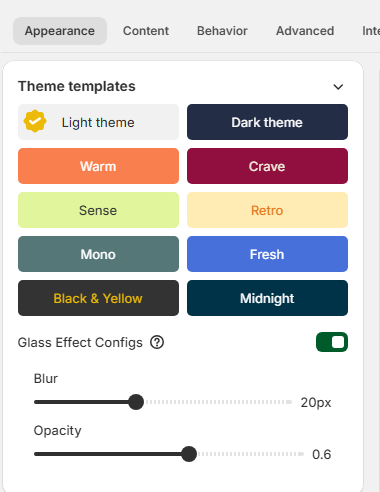
* **Enable or Disable:** Turn the glass effect on or off at any time with a simple toggle in your settings.
* **Adjust Blur:** Set the level of background blur to achieve just the right amount of frosted look for your banner and popup.
* **Set Opacity:** Control how transparent or solid the effect appears, fine-tuning the balance between style and readability.
#### Where It Applies
This effect can be applied to both the **cookie banner** and the **preferences popup**, ensuring a consistent and attractive look throughout your user privacy experience.
***
**With Consentik’s Glass Effect, your cookie notifications aren’t just compliant—they’re also beautifully integrated into your website’s modern design.**