> For the complete documentation index, see [llms.txt](https://docs.consentik.com/llms.txt). Markdown versions of documentation pages are available by appending `.md` to page URLs; this page is available as [Markdown](https://docs.consentik.com/consentik-gdpr-cookie-banner-for-shopline/settings/appearance-customization.md).
# Appearance Customization
Consentik GDPR Cookie Banner on SHOPLINE gives you complete control over how your cookie banner looks and feels on your website. With its powerful customization options, you can easily ensure the banner matches your site’s branding and delivers the best user experience.
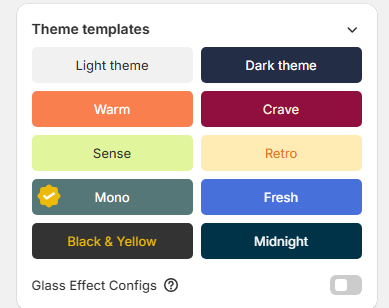
#### Choose from Pre-built Templates
Don’t want to design from scratch? Consentik provides a variety of professionally designed pre-built templates. Simply select the template that best fits your website’s style and you’re ready to go—no design skills required.
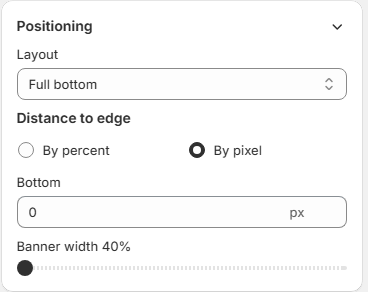
#### Flexible Layout Options
Consentik lets you choose exactly where and how your banner appears on your site:
* **Full Bottom or Top Layout:** Display the banner across the entire width at the top or bottom of your page for maximum visibility.
* **Floating Layouts:** Prefer a less intrusive look? Show the banner as a floating box at the top, bottom, left, right, or even in the center of the screen. This layout is perfect for a more subtle notification.
* **Custom Width & Position:** Adjust the width of your banner and fine-tune its position to fit your site’s design perfectly.
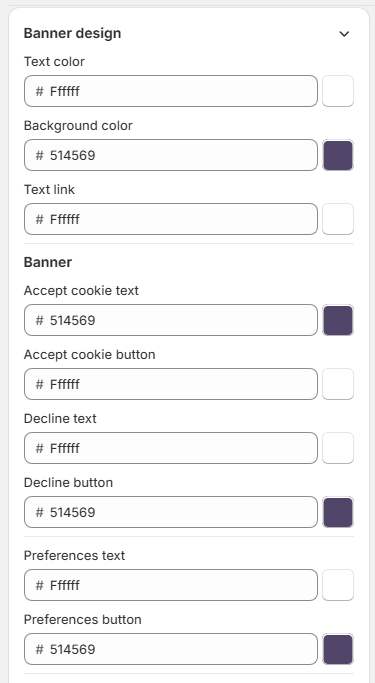
#### Color and Style Customization
Make your banner truly yours:
* **Background Colors:** Pick any color for the banner background to match or contrast your site.
* **Text Colors:** Choose the perfect text color for readability and style.
* **Button & Link Colors:** Customize the colors of buttons and links to encourage user interaction and match your branding.
#### Easy-to-Use Controls
All these customization options are accessible through an intuitive dashboard—no coding necessary. Preview changes in real time to make sure everything looks just right before you publish.
***
**With Consentik, your cookie banner doesn’t just keep you compliant—it also fits seamlessly with your website’s unique design.**